

Legal Disclaimer
At the time of writing this, it’s worth noting that I’ve had this drone for only a few weeks and flown it only a handful of times. Everything contained within this post is my personal opinion and initial impressions of the drone and the components in the box. The more I “play with”/use the drone, the more I’m learning and understanding about it. I will share in a separate post what I think are some good basic things a novice drone pilot should and needs to know based from my personal experience.
I am not a licensed drone pilot at this time. I do not fly drones professionally nor commercially. My knowledge of laws, rules, and regulations is extremely limited, but expanding as I research more for my own knowledge. I only fly my drone either indoors or outdoors at an elevation of less than 100ft/33.3m. I’m typically flying on my personal property or at the local high school. I always keep my drone in sight of myself no matter where I’m operating it at.
It is up to you, the reader, to research and know your local, state, and governmental laws and regulations regarding the safe and legal use of drones in your area. I will attempt to,in a future post, cover as much drone related links and information for the United States and its territories as I can find to share with you.
To learn what I think and have learned about the HJ95 mini drone, continue reading…
I’ve attempted a few cheap drones in the past with varied success. So based on past experience, I kept my expectations low, very low. I was on one of those Chinese run wholesale sites/apps ordering something else. So this was very much an impulse splurge purchase.
This drone showed up, . through the USPS,about 11 days after I placed my order. Upon opening the package, surprisingly, everything that was supposed to be there was. I was not impressed by the packaging for shipping, an opaque white plastic bag with the drone just tossed in with nothing to ensure its protection during the long trip from the China based warehouse.
After miraculously surviving the journey from the warehouse to my mailbox, this drone appears to be slightly better than the 2 drones I previously bought in the $25-$50USD price range. The price I paid does include the shipping cost.
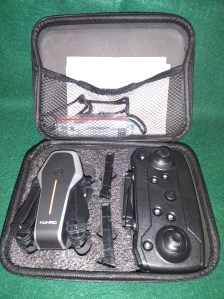
Out of the “box” you have everything you need minus 3 AA batteries for the handheld remote control. I use the term box lightly , as the “box” is merely a plastic bag with the case containing the drone is placed in. For what was paid for shipping, I would expect better packaging.
In the “box” you get the following:
- The Remote Control 📱
- HJ95 Mini Foldable Drone 🚁
- Drone Battery 🔋 (I ordered the one with 3 batteries)
- Instruction Book 📖
- Blade Protectors
- Extra Blades
- Small Screwdriver 🪛
- Carrying Case 💼
Everything together has a total weight of 461g/16.261oz. I will break down each component in its own section with weight and dimension specs as they apply.
Now, I won’t pretend this drone is better than it is or that it’s something it is not. This drone absolutely IS:
- a cheap Chinese direct buy drone
- a good drone for someone who doesn’t want to spend a ton of money on a drone they’re learning with
This drone absolutely IS NOT:
- an expensive DJI drone or anything similar
- not exactly a toy either
While most of your “toy” drones found in the RC section of your local department store might also fit the learning curve bill, this drone gives you a number of the same features those more expensive ones will typically have. I will list those features in the next section.
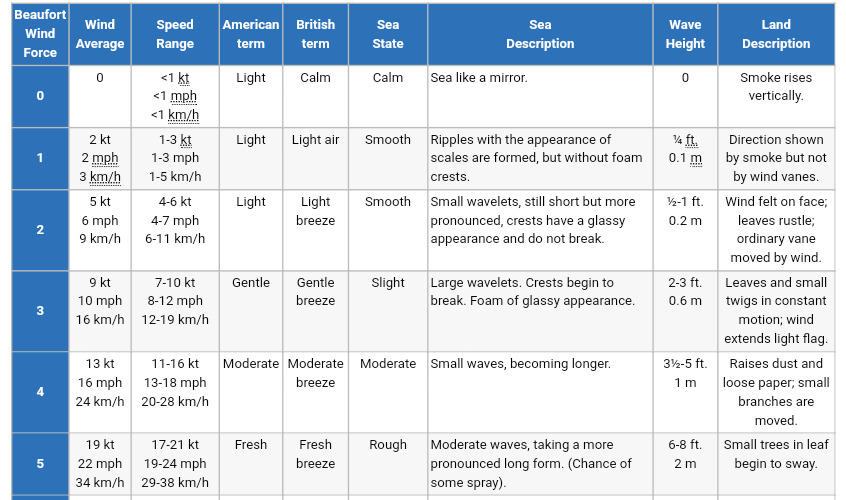
The manufacturer recommends that this drone be flown in wind conditions of “Level 3” or below. With no further context as to what that means, I had to do about an hour or so worth of research I was able to find out that, that means a wind speed range of 12-19 km/h or 10-12mph. The picture below will expand on how to visually judge the wind speed up to level 5 wind conditions (there’s a total of 18 levels). The most accurate way would be to buy an anemometer.
The Drone
As stated earlier, this is not your high end drone. Knowing that, I kept my expectations reasonable and low. That all said, I was pleasantly surprised by this drone. It has met or exceeded my expectations. The list of features that the manufacturer says it comes with is impressive and rivals the high end drones.
Features
- Dual cameras
- 6K camera
- Adjustable camera (manually adjustable)
- 2.4G 4 channel control
- Hover system
- VR visual
- Low power return
- Folding design
- One key return
- 6 axis gyroscope
- App control
- Waypoint flight
- 360° fly around
- Trajectory flight
- Picture taking from app
- Video recording from app
- HD image transmission
- Beauty filter
- One click return
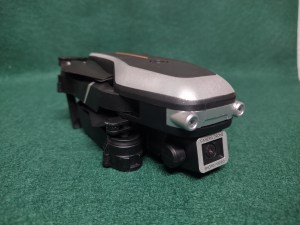
It is surprisingly easy to set up and fly for a complete novice and beginner. There are more buttons on the controller than I know how to use yet, but we’ll save that for later. I do recommend flying where you have plenty of space as upon take off, I need to immediately use the trim buttons to get it to hover. The trim settings seem to reset every time the drone and controller are turned off.

This drone does come with dual cameras. One forward facing camera in either 4K or 6K resolution (even the listing linked below can’t decide which it is) and one on the bottom of the drone facing directly downward. The forward facing camera is manually adjustable up and down only (a 90° range of movement), while the bottom camera is fixed.
The drone is capable of being controlled by either the provided controller or via an app on your phone. In addition, you are able to run both in tandem. When flying via the controller you can use the app to take pictures and videos while you fly. If you are solely flying via the app, you can still take pictures and videos through the app, it just takes a little more coordination to pull off without crashing.

After flying it a handful of times and taking the time to read and pay attention to the directions, I am even more impressed with this drone’s operation. The first 2 things you must do to fly the drone is to pair the drone to the controller and calibrate the gyroscope. Once both of these are done, you’re ready to fly.
Flying the drone is fairly simple and fun. However, I do not recommend flying in “headless” mode until you’ve gotten the hang of it and are comfortable flying it in normal mode, the default mode when you initially turn everything on. Upon take off there is still a slight drift but not nearly as bad as when the calibration isn’t done. While I probably should use the propeller guards, I’m just too lazy to be bothered snapping them in place. I would recommend that if you’re new at this, take the time to install them, your drone will thank you later.

Technical Specs
- Size folded: L117.1mm/4.61in x W61.7mm/2.43in x H52.8mm/2.08in
- Size opened: L152mm/6.00in x W184.5mm/7.25in x H52.8mm/2.08in
- Weight: with battery 93.2g/3.287oz w/o battery 75.2g/2.652oz
- This makes it a category 1 by US FAA regulations based on weight of less than 0.55lbs/250g. More than that it’s a category 2.
Propeller Specs
- 106.8mm/4.2 inch diameter
- 8.2mm/0.32in tall shaft
- 3mm/0.11in – 3.6mm/0.14in inner shaft diameter
- Pitch: 0.748mm/0.729in
- 4.2in x 0.729in x 2
- Height differace from leading edge to trailing edge: 3.4mm/0.13in @ 75% prop radius
- Propeller blade thickness 1mm/0.04in
- Bull nose prop design
Formula to find the pitch found HERE (main source) or HERE (summerized version)
The Batteries
I don’t have much to say about the batteries. They’re batteries, they last about 15 minutes of constant use. For their size and weight, I’m surprised they last as long as they do.

Using the charging cord provided or any micro USB cord to charge the batteries, it takes 1 – 2 hours to fully charge(manufacturer says 60 minutes to full charge). This is assuming you’re in the USA using a standard 120V outlet.
I am unable to comment on how long it would take in a country that uses 240V outlets. I have yet to attempt to charge them from one of those portable battery packs people carry to charge their cell phones with.
Technical Specs
- Size: L 67.7mm/2.66i x W 24mm/0.94in x H 9.7mm/0.38in
- Weight: 18.5g/0.652oz per battery
- Capacity: 3.7V 800mAh
- 10-15 min endurance (flight time)
The Remote Control
Where to begin with the remote…
The remote control looks fancier and higher end than it really is. It feels like you might expect for the price range it was found in. The manufacturer added “antenna” on the top of the remote that does absolutely nothing to the function for the operation of the remote. The antenna do not function and are only there for ascetics. They do not extend range or have anything to do with your frequency connection between the drone and remote.
Aside from the buttons on the front operating as common sense would expect them to, the buttons on the top of the controller can be a little confusing to understand and the provided instructions do little, in my opinion, to aid in alleviating that confusion. You can always take the fun but maybe a haphazard approach and just press them to see what happens.
The four buttons on the top of the controller work by either a short or long press to activate their function. As stated, the instructions do give some guidance on how to use them. I’ve personally had no luck getting the top buttons to function as stated in the instructions, but that may be due to sensors in the drone knowing I’m indoors and do not have enough space to perform the function requested.
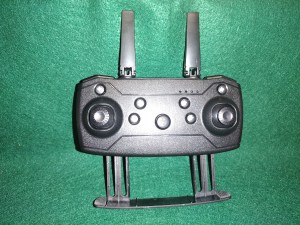
The instructions do not tell you that you have to “pair” the remote to the drone before it can be used. To “pair” the remote to the drone you simply push the left joystick up as if you’re taking off and back down as if you’re landing. You should hear an audible beep at each step. Once that is complete, the lights should stop flashing and should stay on steadily. Now you can either fly it right away or with it on level ground, calibrate it via the instructions (I recommend calibration before flight).
In my opinion, the cell phone holder would be better served on top instead of the bottom rather than the fake antenna.
Technical Specs
- Size: L 149.9mm/5.9in x W 77.3mm/3.04in x H 36.9mm/1.45in
- Weight: with batteries 207.8g/7.329oz w/o batteries 137.5g/4.85oz
- Control distance: 80 – 100 meters
- Pic transmission distance: 50 – 80 meters (real time transmission)
The Carrying Case
The carrying case is as basic as you can get. It’s just big enough to hold everything. While it does the job intended, it doesn’t hold everything as securely as I personally would prefer. It feels too flimsy and I don’t feel as if it would protect the drone and controller inside very well to travel with. Sitting on a shelf or desk to keep everything together for a quick grab, it’s fine but I wouldn’t want to travel anywhere where it could take a beating (airlines or in a backpack).
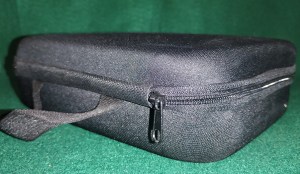
I am currently searching for a hard case alternative that I can modify slightly to replace this case with. Usually I can find something “close enough” to my needs, but this particular search is proving difficult for my exact requirements. As such, I may have to custom fabricate a new light weight hard shell case for my drone. If I do, I’ll cover that process in another post in as much detail as possible.
Technical Specs
- Size Outer: L 213mm/8.38in x W 154.5mm/6.08on x H 65mm/2.56in
- Size Inner: L 204mm/8.05in x W 152.4mm/6in x H 59mm/2.32i
- Weight: 93.7g/3.298oz
The Maintenance Items
I’m not sure there’s much to be said here. These items are as simple as you might get with a drone. Four extra blades, 2 for the clockwise motors and 2 counter clockwise motors, were sent in the box along with one small Phillips head screwdriver (link below says there should be 2 screwdrivers). In addition, not pictured are the blade protectors (4 of them, one for each corner).

Technical Specs
Weight (screwdriver, blades, plastic bag, and blade protectors): 9.4g/0.179oz
Propeller blades: width at thickest point is 14.3mm/0.56in. Weight per blade 0.45g/0.016oz
The App
As one might expect under the current technological advances we have made since drones first came out, you are able to completely control this drone from an app on your phone. The app is available through the Apple store and Google Play store. As I have the Android OS, I can say that it is a free download for Android users. I cannot speak for those who use the Apple OS.
The app has all the same features that the controller does plus it allows you to be able to see through the camera and take pictures and videos. My experiance with the app so far is it is trickier to use over the controller. Specifically, the joystick controls on the app seem to be a lot more sensitive vs the controller. There is deffinatly a bigger learning curve to controling the drone through the app vs the controller.
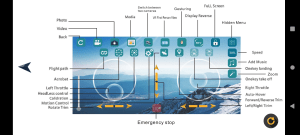
I have yet to figure out how to use the flight path feature, there are no instructions or guides I can find yet that explain how to use it. Some of the other features available in the app I am still trying to figure out how to work successfully include the auto hover, gesture, motion control, and if I ever get a phone compatable headset, the VR view. If the lack of information on the app is still an issue by the time I figure out how to sucessfully use everything, I will do an in depth write-up on the app and the features it has.
However, using some of the other features of the app are simple. You just have to remember for the app to work with your drone, you need to have your phone’s wifi turned on and connected to the drone (WIFI_4K_W*****C). The * represents an alphanumeric part of the drone wifi name (I ommited mine for security reasons). I do not know if the wifi name is the same between all drones from this manufacurer or if they are unique to each drone.
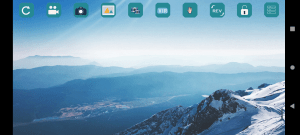

The above 2 pictures are as as the app looks on my phone.
The Instructions
The instructions provided in the box are adequate at best. They cover the basics of what you need to know about the drone and controller. The instructions are written in 2 languages, English and what looks like Chinese. As the drone shipped directly out of China, I would make the assumption the 2nd language is Chinese.
Parts of the explanation of the controller’s top buttons are not completely clear as to where exactly it’s pointing. If the manufacturer would have had pictures with the explanations showing the icons on those buttons, it would have saved the confusion.
The instructions will provide you with enough information to get you started flying your drone. However, in my personal opinion, I do not feel that they are comprehensive enough for a novice pilot despite the drone itself being easy enough to fly and handle for a novice.

One thing the instructions fail to tell you is how to pair the remote to the drone. This was covered in the controller section, but I will state again how pairing is done. Turn on both the drone and the controller. On the left joystick on the controller, press up as if you’re taking off, you should hear an audible beep. Then press down on the same joystick as if you’re landing, you should hear another audible beep. Once you’ve heard that second beep, the lights on the drone should stop flashing and be on steady. If this is the case, you are paired and ready to calibrate as per the instructions.
As of the time of writing this post, there is little in the way of reviews on this drone. And the bulk of what’s available on YouTube is not in English.
Potential Modifications
While this drone is more capable right out of the box than my current skill level, there are a few things I can already see I want to change. I want to get some additional spare blades to have on hand. I want to play around with different pitch angles to see if I can find something more optimal and stable for my intended use. I may try to convert from a 2 blade propeller to a 3 blade propeller. The carrying case is top of the list of upgrades to make. I want to see if I can find some additional batteries with a higher mAh rating to extend my flight time. Outside of those, I cannot think of anything else I might need to do to the drone.
Final Thoughts
Weighing out the pros and cons of this drone, I am surprisingly pleased with it. It is very easy to get flying right out of the box. There are some shortcomings, but with the price point paid for this drone, I shouldn’t be as surprised about them as I am. I would reccomend this drone for a beginner, but with a few points of caution prior to purchase. If I had to buy this drone again for the first time knowing what I know know now, I absolulty woud purchase it again.
In my opinion, the shortcomings are not detrimental enough that they can’t be either overlooked or upgraded to possibly enhance your experience flying it. You may be completely happy with this drone as it is, I just have this thing where I cannot leave something alone without modifying it and putting my personal touch on it. Either way you go, leave it stock or modify it, you can’t go wrong as long as your modifications keep it within its operating specifications.
If you’re a zero experienced novice, I would recommend starting out using the controller before trying to use the app to fly the drone. Give yourself some time to get used to your drone and to get a feel for its operation. Then once you’ve gotten enough flight time, start your transition over to the app for complete control of the drone.
Or I suppose you could just go straight to the app and forget about the controller all together. It’s really your choice in the end. Regardless of what you choose to do, expect to crash countless times and get frustrated when it doesn’t do exactly what you intended it to do. But overall, this is a starting point, so learn, practice, and most of all, just have fun.
Link Disclaimer
The following links may not be to manufacturer approved drone parts for this drone. Most if not all parts links will be for aftermarket parts. It is your responcibility to decide if you think a particular part will fit your drone. Only buy parts you are reasonably sure will fit and work after you have researched and made as many accurrate measurements as possible. I am only providing you a gateway to find parts that may be within manufacturer specs for your drone. I am not responcible for any parts you buy or modifications you make your drone as a result of following any links I have provided in this post.
Links
- HJ95 Drone
- HJ95 Drone Controller App (WiFi _Cam) Android OS
- Propeller Pitch Formula
- Beaufort Wind Scale
Replacement Parts
Till next time, Happy Trails and remember, If I can do it, You can do it.

 The Wandering Leatherneck